
Downloading stuff from GitHub
Mastering the Octocat
MrWatson’s tools are hosted on GitHub, so you’ll need to know how to download stuff from GitHub.
GitHub can be a bit daunting at first, so here is a quick cheat sheet.
Downloading the latest stable release
To download a tool from GitHub, for example fmWorkMate, simply…
- Navigate to the latest releases page on GitHub by following a link on this website / in fmWorkMate, or enter the URL directly into your browser…
https://github.com/«github-user-name»/«tool-name»/releases/latest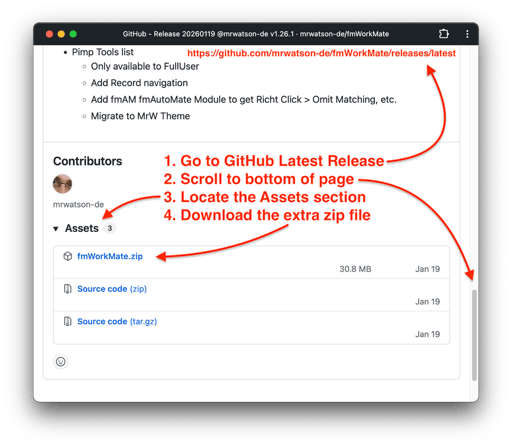
- For example
- fmWorkMate
https://github.com/mrwatson-de/fmworkmate/releases/latest
- fmAutoMate
https://github.com/mrwatson-de/fmautomate/releases/latest
- fmIDE
https://github.com/fmide/fmide/releases/latest
- fmWorkMate
- Scroll to the bottom of the page to the Assets section
- Click on the zip file to download it
- Unzip the archive
- Follow the instructions to place the tool where it belongs (see the installation instructions for the tool you downloaded), or, generally:
- For fmWorkMate:
- Move the unzipped folder to your
Applicationsfolder (or wherever you like to keep your apps)
- Move the unzipped folder to your
- For fmWorkmate external tools:
- Move the unzipped folder to be a neigbouring folder of your fmWorkMate folder
- For fmCheckmate-XSLT:
- Rename the unzipped folder to
fmCheckmate, if necessary, and move it to yourDocumentsfolder so that the xslts are located at~/Documents/fmCheckmate/xsl/«subfolder»/«file.xsl»
- Rename the unzipped folder to
- For fmWorkMate:
- Double-click the tool to launch in FileMaker Pro
Downloading the latest cutting-edge version
If you want the latest cutting edge version (with cool, new bits but more bugs) of a tool instead of the latest stable release, you can download the latest code from the main repo page.
- Navigate to the main repo page on GitHub by following a link on this website / in fmWorkMate, or enter the URL directly into your browser…
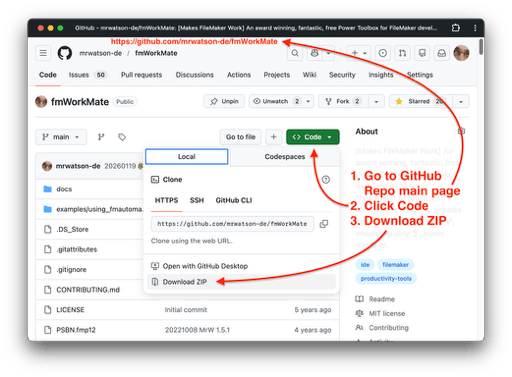
https://github.com/«github-user-name»/«tool-name»/releases/latest- For example
https://github.com/mrwatson-de/fmworkmate/releases/latesthttps://github.com/fmide/fmide/releases/latest
- Click the green
Codebutton - Click
Download ZIP - Unzip the archive
- Note: You’ll need to rename the unzipped folder to remove the suffix (
-mainor similar)1 e.g.fmWorkMateinstead offmWorkMate-main) before coninuing with the installation, as above.
-
The suffix identifies which branch the code came from, which is usually the main branch (thus
-main) ↩