

fmWorkMate
Makes FileMaker work
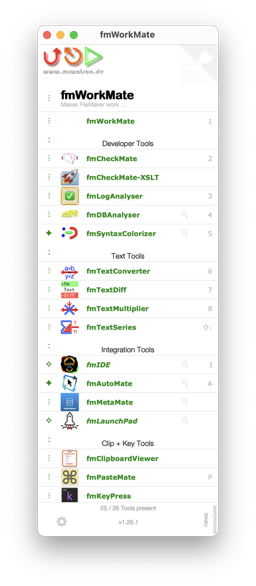
A free toolbox
full of power tools for FileMaker developers.
Whether you are a beginner or an experienced developer, fmWorkMate surely has a tool to help your development experience.
- Need to rename variables in scripts?
- Use
fmCheckMate’s Find and Replace functionality
- Use
- Fed up of errors due to broken pasted code?
- Use
fmLogAnalyserto check and fix your pasted code
- Use
- Want to transfer code between computers?
- Use
fmCheckMate’s Convert-&-Transfer Mode to quickly beam code between computers
- Use
- Want to quickly check your layout for potential issues?
- Install the
fmCheckMate-XSLTlibrary and usefmCheckMate’s Layout Analysis feature.
- Install the

See Solutions to Daily Problems for more common problems and how to solve them using fmWorkMate & co.
Installation and Setup
Install fmWorkMate to get access to a variety of useful tools right inside FileMaker Pro.
Setup fmWorkMate to target the FileMaker you use and work in the mode which fits your task.
Getting started
Once you have installed and set up fmWorkMate, you can use the toolbox tools right away.

TL;DR: Skip the rest and jump start your experience to get started quick.
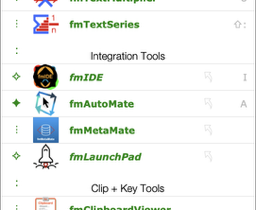
From the indicator to the left of a tool you can see whether
:the entry is a group of tools⋮the tool is part of the fmWorkMate toolbox✧the tool is an external tool but missing✦the tool is an external tool and present
To open a tool, just click on its name, or, if available, press the corresponding shortcut key (⌘ + the key(s) shown faintlyon the right).
Discovering and downloading other tools
Use the icon to the left of the tool to open the tool menu:
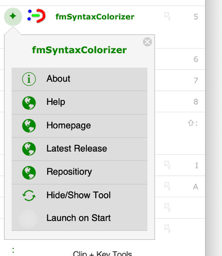
AboutOpen a short description of the tool with links to the documentation and the GitHub repoHelpOpen the fmWorkmate.com help page for the toolHomepageOpen the fmWorkmate.com homepage for the toolLatest ReleaseOpen the GitHub releases page to download the latest version of the toolRepositoryOpen the tool’s GitHub repository pageHide/Show ToolYou can hide the tool here if you don’t need it. (Good luck getting it back though!)Launch on StartUse with fmLogAnalyser and theBug Off!Alarm to catch errors as you make them.
The Tools
The tools in fmWorkMate are grouped under various headings:
For an A-Z list of all tools, see the Help Page, or use the search function.