This page is a 🚧 WORK IN PROGRESS 🚧
fmCheckMate Instant DDR
Faster and smarter analysis
fmCheckMate has a great little trick up its sleeve for more powerful instant analyses:
fmCheckMate’s iDDR (instant DDR) feature builds up DDR-like info from your clipboard.
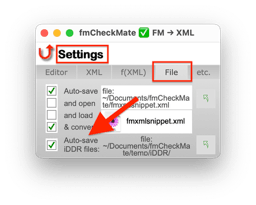
With iDDR turned on, fmCheckMate remembers the stuff you copy and can use it in later analyses.
The most powerful use case is combining theme information with layout objects in order to discover style names and not just useless UUIDs.
- Turn on iDDR in the fmCheckmate Settings
- ⌘9 ⌘9 >
File - Check the
Auto-Save iDDR filesbox
- ⌘9 ⌘9 >
- Save the Theme info in fmCheckMate’s iDDR:Copy the theme
- Open the Theme dialog in FileMaker
- Select the theme you want to analyse
- Copy the theme to the clipboard
- Convert to XML in fmCheckMate
- Now copy the layout bjects you want to analyse
- Open the layout in FileMaker
- Select and Copy the objects to the clipboard
- Convert to XML in fmCheckMate
- Now analyse the objects supported by the iDDR theme information
- Press
[T]to choose a transform - Search for
Analyse Layout Objects with iDDR Theme Info - Press return to run the transform
- Press
FIXME That, at least, is the theory.