
fmAutoMate Services
Power to your entire Mac

fmAutoMate Services extend the power of fmAutoMate beyond the bounds of FileMaker and brings context menu functionality to your entire Mac!
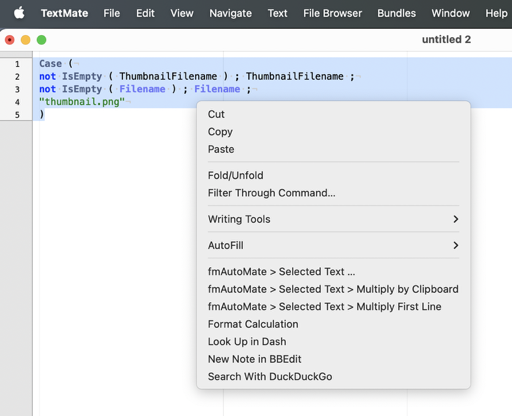
fmAutomate Services are Mac OS services that can be reached from the Right click > Context menu > Services menu in text fields throughout your system.
Here is an example of using fmAutoMate Services in TextMate to format the selected text:
Install fmAutoMate Services
- Click
[fmAutoMate Services…] - to open the information popover
- Press
[Install fmAutoMate Services…] - to try to install the services
If that fails
- Click
[fmAM-Services] - to open the folder and install the services manually by clicking on the files.
If the folder is not present donload the latest release from GitHub Releases again to get the full release including subfolders.
- Press
[Mac Services] - to open the services folder on your mac to manage what is already installed