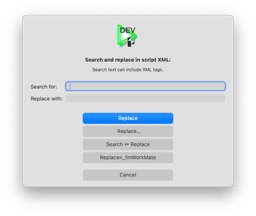
fmAutoMate Rename All
Click - done
- Select your code
- Press CMD⌥A - for Replace All
- Enter search text and replace text
- Press
[Replace]
Done!
Multiple Replacements
If you want to do multiple replacements, just press [Replace…] to keep the dialog open.
Recontextualise Code
To recontextualise code from one Layout to another.
FIXME - not quite right yet…
- Go to the source layout
- Copy the code (buttons/objects/fields)
- Press ⌘⌥A to open the Replace All dialog
- Press the
[Replace = LayoutTable]and[Swap Search and Replace]buttons to set the Search text automatically - Press
[Cancel] - Go to the target layout
- Press ⌘⌥A to open the Replace All dialog again
- Press the
[Replace = LayoutTable]to set the replace text automatically - Press
[Replace]