
fmLogAnalyser
PROVES you are right!
fmLogAnalyser is part of the fmWorkMate toolbox and is installed when you install fmWorkMate.
Did That Just Break?
When pasting stuff in to FileMaker you’ll find yourself asking Did that just break?
When you paste (or import) code into a FileMaker solution things can easily break (for example, if referenced items are not present or names have been changed).
Fortunately, when this happens FileMaker creates log entries (in the import.log file) to help you find out what went wrong (most of the time) at least.
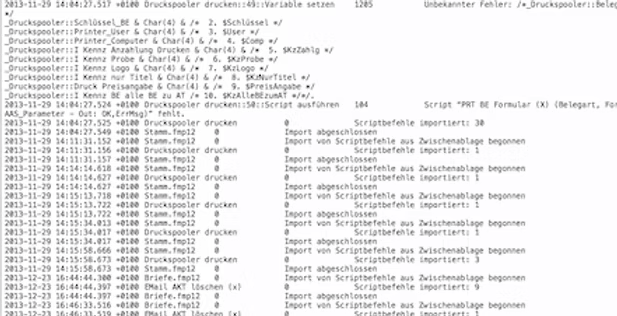
The import.log file
The import.log file is created in the same folder next to your FileMaker file, or, for hosted files, in your Documents folder.
Whilst it does contain the info you need, it is not very user friendly to read.
fmLogAnalyser to the rescue!
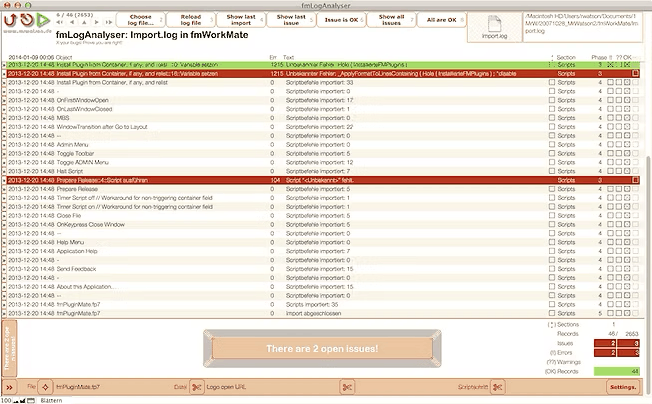
fmLogAnalyser - a to do list of errors
fmLogAnalyser
- presents the log file elegantly
- highlights issues (errors and warnings)
- turns any errors into a to-do list!
Work through your fmLogAnalyser to-do list…

…and when you get the [OK]…

…you KNOW you are right!
:-)
What FileMaker doesn’t log
- FileMaker does not log anything from the Layout Workspace.
- Shame on Claris, because this is really the place you need it the most!
- MrWatson to the rescue with Layout Analysis with fmCheckMate!
- FileMaker does not log custom function paste errors.
- MrWatson to the rescue with [Custom Function Analysis with fmCheckMate]!